Nowadays, it’s fairly easy to build a website, but there is one thing that many people don’t take seriously enough – web hosting. Whether you have a personal blog, a small business website, or a full-fledged online store, the speed, security, and reliability of your website depend directly on your hosting provider. If you choose the wrong hosting, your website will load slowly, be down often and in the worst case your data will be at risk.
In this article, we’ll guide you through each step on how to pick the cheap web hosting – from the types of hosting out there to the essential features you need to look for – so you can make an informed choice for your website.
What is a Web Hosting?
In simple terms, web hosting is when a company takes the files of your website, stores them on their servers and makes them available to people online 24/7. When someone types your domain into a browser, the browser connects to your hosting server and retrieves your website’s files. No matter how great the website design is, the website just cannot exist on the internet without hosting.
Main Categories of Web Hosting
Before deciding on a hosting plan, it’s important to know your options. Each is designed for a different audience and use case.
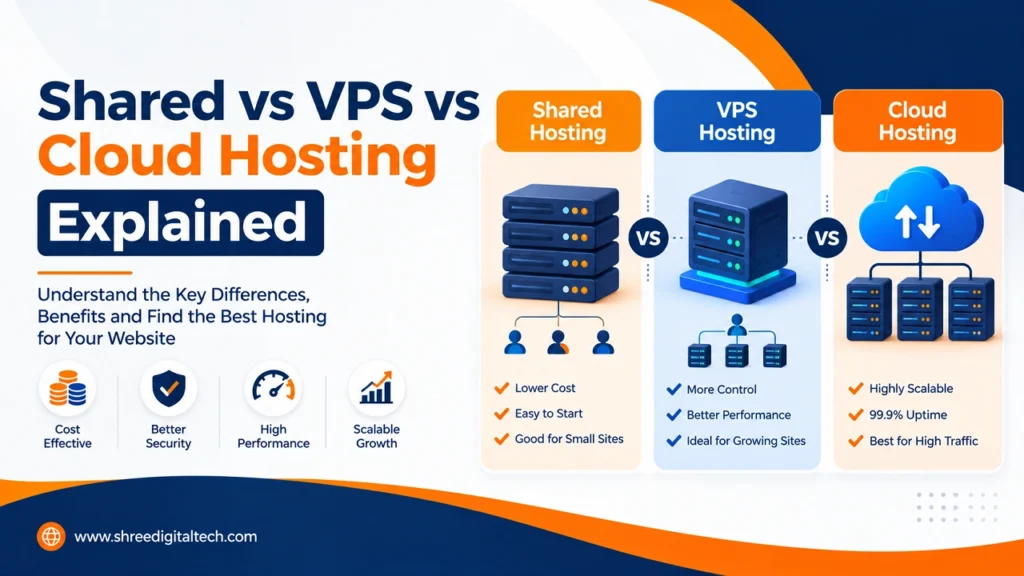
1. Shared Hosting
With shared hosting, your website shares the server’s resources with other websites. It’s like living in an apartment building where the common areas are shared. It’s the cheapest plan, and is perfect for beginners, personal blogs and small businesses with low to medium traffic. The downside is that if another site on the same server experiences a traffic boost, your site’s performance can suffer as well.
2. VPS (Virtual Private Server) Hosting
VPS hosting is a middle-ground option. You still share the physical server but you have your own partitioned space with guaranteed CPU and RAM resources. It provides more control, more performance and more stability. This is perfect for sites that have outgrown shared hosting but are not quite ready to pay out the full price of a dedicated server such as growing e-commerce stores or medium traffic business websites.
3. Dedicated Server Hosting
With dedicated hosting you get a physical server dedicated to your website. You have the more control, best performance and finest security, but it is also the most expensive and requires technical expertise to manage. This is ideal for high-traffic portals, large enterprises and websites with sensitive data.
4. Cloud Hosting
Your website is hosted on a network of servers in the cloud. If a server goes down, another one takes over right away. Very scalable and works great for websites with unpredictable or fluctuating traffic, e.g. SaaS or fast-growing businesses – you usually only pay for the resources you are actually using.
| Hosting Type | Best For | Est. Monthly Price |
| Shared Hosting | Beginners, blogs, small sites | Low ($3–$15) |
| VPS Hosting | Growing sites, small e-commerce | Medium ($15–$80) |
| Dedicated Hosting | High-traffic, enterprise level sites | High ($80–$500+) |
| Cloud Hosting | Variable/scaling traffic, SaaS | Usage-based |
Things To Look for When Selecting Best Hosting
1. Understand Your Website Needs
First, determine the goal of your website – is it a text-heavy blog, an image-heavy portfolio, or a site with video/audio content? Your storage and bandwidth needs will depend on what kind of content you have. A simple blog could easily get away with less than 1GB, while an e-commerce store with high-resolution product images could require 5-10GB of storage or more.
2. Reliability and Uptime
The time your website is up and running is essential for its success. Select a provider that guaranties at least 99.9% uptime. Hence, your site will hardly ever, if at all, be inaccessible to visitors. The best providers will state this clearly in their SLA (Service Level Agreement) and will often offer compensation if they don’t meet it.
3. Performance and Speed
The speed at which your website loads directly affects user experience and Google search rankings. Look for SSD storage, CDN integration like Cloudflare, and server-side caching. Server location matters too – pick a provider that has a data center near your target audience to minimize delays.
4. Safety Features
Safety should never be compromised. Search for free SSL certificate, firewall protection, DDoS protection, malware scanning and regular automated backups. If you are taking payments (e-commerce) then you need to be hosted in a PCI compliant environment.
5. Scalability
Your website may be small now, but it’s likely to grow in the future. A good hosting provider allows you to move to a higher tier without much hassle or downtime. If you’re not sure about your choice, don’t sign up for a long-term agreement.
6. Support For Customers
24/7 support through live chat, phone or email is a must-have feature as technical issues can happen anytime. Before signing up, try out their pre-sales support, so you can get an idea of how responsive they actually are.
7. Pricing and Renewal Pricing
Don’t just make your decision on the cheapest price. Many providers offer attractive introductory pricing that jumps considerably at renewal. Always check the cost of renewal so you can accurately plan your long-term budget
8. Ease of Use and Control Panel
Beginners will find it much easier to manage their website with user-friendly control panels such as cPanel, DirectAdmin or Plesk – creating email accounts, managing databases or installing a CMS like WordPress with one-click installers (such as Softaculous) all become simple.
A Simple Decision-Making Framework
1. Low traffic and budget, you are a beginner → Choose Shared Hosting.
2. You have a growing website, or moderate e-commerce traffic – Go for VPS Hosting.
3. Lots of traffic, needs enterprise level security → Think Dedicated Hosting.
4. Traffic changes quickly or is hard to predict; cloud hosting is best.
Always shortlist your options to 3–5 providers, read real reviews (on platforms like Trustpilot or G2) and make an apples-to-apples comparison — meaning compare plans with similar storage, bandwidth and resources, not just price.
Conclusion
The first step to a successful website is choosing the right web hosting. Decide based on your website’s needs, expected traffic, budget and technical comfort level. Regardless of your blogging journey, the right hosting plan will provide you with better speed, security, reliability, and a smoother user experience – which has a direct impact on your website’s success in the end.
FAQs
1. Which is the best web hosting for beginners?
If you are a beginner, I recommend going with shared hosting as it is inexpensive and control panels are easy to use. Managed WordPress hosting is also a good choice if you have a little more flexibility in your budget.
2. How much does web hosting cost?
The price depends on the type of hosting. Shared hosting usually costs $3-$15/month, VPS hosting costs $15-$80 or more and dedicated hosting costs $80-$500 or more per month, depending on the features and resources offered.
3. Can I upgrade my web hosting package later?
Most reputable providers have an upgrade path in place, so yes. As your traffic grows you can easily scale up from shared hosting to VPS or cloud hosting.
4. Shared hosting vs VPS hosting: What’s the difference?
Shared hosting means that you share resources with other sites on the same server. With VPS hosting you’ll have your own partitioned space with guaranteed CPU and RAM, which improves performance and stability.
5. What is managed hosting?
When you use managed hosting, the service provider takes care of server maintenance, security patches, and technical management, so you can focus on the content of your website. If you want unmanaged hosting, it’s entirely up to you.
6. Do I need an SSL certificate for my site?
Hell yeah. An SSL certificate encrypts data, builds trust of visitors and is also a Google ranking factor. Most hosting providers have free SSL services like Let’s Encrypt.
7. What to Look for in e-Commerce Website Hosting?
An e-commerce website should look for SSL support, PCI compliance, strong security (firewall, DDoS protection), frequent backups, and the capacity to manage traffic spikes because this also includes payment and customer data.
8. Can I use one hosting account for multiple websites?
Many VPS and dedicated plans allow for multiple sites, but shared hosting plans typically have limits. Always review the provider’s policy before signing up.