When you create a website or start a business on the web, one of the first choices you’ll need to make is choosing the right hosting. Shared Hosting, VPS Hosting and Cloud Hosting options, it can be hard to know which one is right for you.
Different types of web hosting offer different levels of price, performance, control, security and scalability. Your choice will be influenced by the size of your website, the amount of traffic it receives, your budget, your technical knowledge and your future plans.
Here we will explain Shared, VPS and Cloud Hosting in simple terms including pros, cons and best use cases. This will help you understand what you are paying for and choose an option that is right for your website, rather than wasting money on features that you may not need.
What Does Shared Hosting Mean?
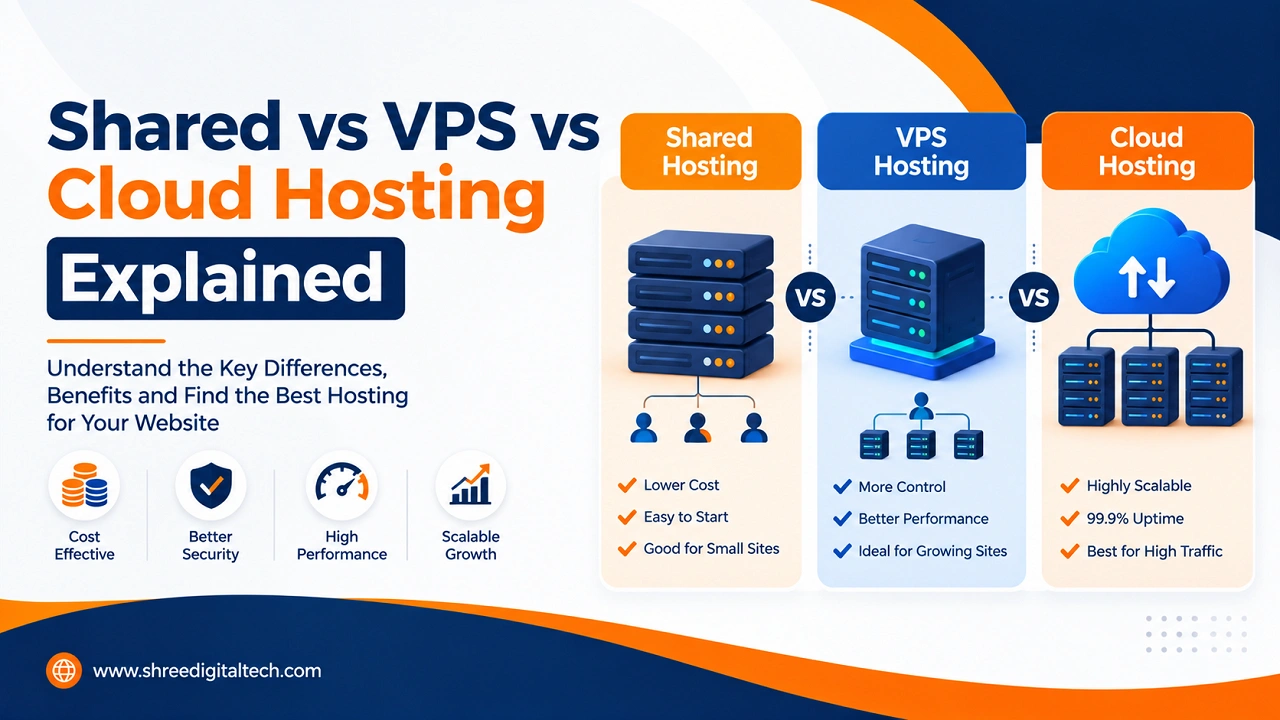
Shared hosting is typically the most affordable and simplest hosting option. this configuration allows to host multiple web sites on the same physical server sharing resources like CPU, RAM, storage etc.
The cost is lower because it is shared by the server. It is also easy to set up and most hosting companies provide a control panel such as cPanel to manage your website.
This might be enough for a new website. If your site is mainly basic pages, blog posts, images or a small product catalogue, then you probably don’t need the extra power of a VPS or Cloud Hosting.
Advantages
• Low-cost and appropriate for limited budgets
• Easy to install and manage
• No technical skills required
• Compatible with WordPress and other popular website platforms
• Typically includes basic support and website management tools
Disadvantages
• Other websites on the same server can affect website speed
• Not good for websites with heavy traffic
• Server settings are less controllable
• Limited security and customisation options
• Resources can be limited as your website grows
Shared Hosting is a good option for personal blogs, portfolio websites, small business websites, and new projects with low to moderate traffic. It’s also useful when you’re launching your first website and want to keep the costs to a minimum.
What is VPS Hosting?
VPS is an abbreviation for Virtual Private Server. It uses one physical server and splits it up into many virtual servers. This means each virtual server gets a certain number of resources, giving you more control and better performance than shared hosting.
With VPS Hosting you can also customise the server settings and install the software as per the requirements of your website.
One of the biggest benefits of VPS is that your website is less impacted by the activity of other websites. Your get your own allocated resources, which can make the performance more consistent.
A VPS can also be useful if you need specific software, custom server settings or more control over how your website works.
Advantages
• Better performance than shared hosting
• Virtual resources committed
• Greater control and customisation
• Root access is often available
• Resources grow with your website
• Good for the websites requiring more stable performance
Disadvantages
• Costlier than shared hosting
• An unmanaged VPS may require technical knowledge
• More time consumed in server management
• Poor configuration can cause performance or security issues
VPS Hosting is a great choice for growing websites, online stores, web applications and businesses with moderate traffic. It offers a good compromise between cost and performance.
What is Cloud Hosting?
Cloud hosting is not like traditional hosting. Your site is not hosted on a single physical server, but rather on a network of interconnected servers.
If one server goes down, another server can take up some of the load. This makes cloud hosting a popular option for websites with high demands for reliability and flexibility.
Cloud hosting is especially useful when traffic to your website is hard to predict. For example, a web store may receive much higher traffic during a sale or holiday season. These changes are typically elastic in cloud resources.
It can also be useful for companies that expect rapid growth for their websites or applications and need hosting that can expand as demand increases.
Advantages
• Highly reliable and available
• Easy scaling with increased traffic
• Good for unpredictable or heavy traffic
• Flexible resource use
• good for large websites and applications
• Can help businesses with changing resource requirements
Disadvantages
• Usage-based billing can be harder to predict costs
• Management is more complicated for beginners
• Some setups require technical knowledge
• High costs due to bad resource management
Cloud Hosting is generally best suited for large e-commerce sites, SaaS applications, high traffic websites and businesses with unexpected spikes in traffic. It’s also useful for businesses that have customers in different regions.
How Performance May Differ
Performance is one of the main reason people switch from Shared Hosting to VPS or Cloud Hosting.
Shared Hosting is where multiple websites share the same server resources. Sometimes your website may work slower if another website suddenly gets a lot of traffic.
With VPS Hosting, you get dedicated resources for your virtual server, such as CPU and RAM. This makes it a better choice for websites that need more stable performance.
Cloud Hosting adds an extra level of flexibility. Resources can often be scaled up or down depending on demand making it useful for websites with changing traffic patterns.
But hosting is not the only thing that impacts website speed. Images, plugins, website code, databases, caching and content delivery can also have a huge impact.
Security and Backups Also Matter
Don’t ignore hosting security when you’re choosing a plan. Shared Hosting can be secure if it is managed properly, but you will have less control over the server environment.
A VPS allows you more control over security settings, software, and access. However, more control also means you may have more responsibility to keep the server secure.
Strong safety features can be found in Cloud Hosting, but the level of protection you receive depends on the provider, and how the account is set up.
No matter what kind of hosting you use, you should be doing backups regularly. Having a backup can be a lifesaver if you accidentally delete files, your website gets compromised, or a technical problem occurs.
What kind of Hosting Do You Need?
It really depends on what your site needs today, and where you see it going in the future.
Choose Shared Hosting if: You have a low to medium traffic site You are new and have a small budget.
Choose VPS Hosting if: Your website is growing; you want more control and better performance without paying for a dedicated server.
Choose Cloud Hosting if: You’re seeing a lot of traffic to your website or traffic that fluctuates a lot and you need to make your website more scalable and reliable.
You should also consider customer support, backup options, storage, bandwidth, security features, upgrade options and the reputation of the provider before making a final decision.
It has more resources, but you don’t have to go for the most expensive option. The better way is to choose hosting to suit your needs at the time and then upgrade when your site actually needs more power.
Summary
Shared, VPS and Cloud Hosting each have their own strengths and weaknesses. Not all websites are one-size-fits-all.
Shared Hosting can be a practical choice if you’re launching a small website. As your traffic and business needs grow, you can upgrade to VPS or Cloud Hosting for enhanced performance, control, and scalability.
The most important thing is to select hosting according to your website’s traffic, budget, technical needs, security requirements and future growth. As your online presence expands, a good hosting plan can help your website stay fast, stable, and ready to serve visitors.
FAQs
1. What is the difference between Shared, VPS, and Cloud Hosting?
Shared Hosting shares server resources, VPS offers dedicated virtual resources, and Cloud Hosting uses multiple connected servers for better flexibility and reliability.
2. Can I upgrade from Shared Hosting to VPS or Cloud Hosting later?
Yes. Most hosting providers will offer migration services so you can upgrade your hosting as your website grows.
3. Which hosting alternative offers greater security?
VPS and Cloud Hosting usually offer more isolation and control than Shared Hosting. But security also depends on the server’s configuration and how the site is maintained.
4. Is VPS Hosting good for a beginner?
Managed VPS can be a good choice for beginners as the hosting company takes care of many of the technical aspects. An unmanaged VPS often requires more server knowledge.
5. How much does Cloud Hosting cost?
Cloud Hosting has usage-based pricing. The ultimate cost may be based on elements such as CPU, RAM, storage and bandwidth.
6. Which hosting is best for a high-traffic ecommerce website?
If you run a busy online store, Cloud Hosting is often a good option, as you can increase resources when traffic spikes.